Spend ten minutes on X and you'll find people arguing about whether the thing they built is an "AI agent" or "agentic AI." It's the wrong argument. The label was never the hard part. The hard part is that how your company actually runs lives in people's heads, not in your integrations.
What unlocks it is a use case: one repeatable job an agent can own from trigger to reviewable result, across the tools you already pay for. The 20 below are the workflows we publish as workflow automation examples, each one running today with real connectors, a real schedule, and a real deliverable. Every entry includes the prompt that starts it, so you can copy one and run it before you finish reading.
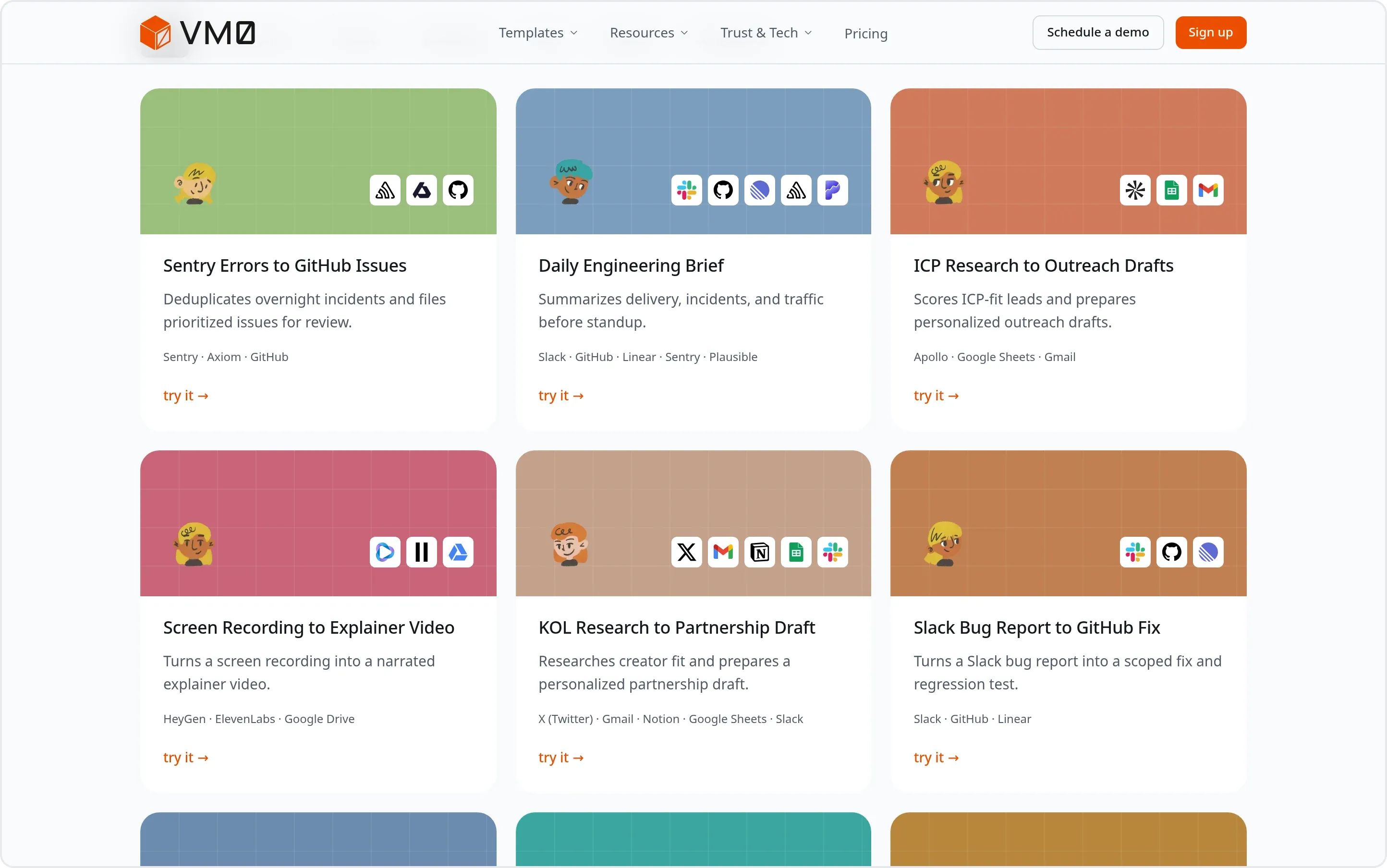 Every workflow below is a live example page: the trigger, the tools it connects, and the deliverable it produces. Browse all twenty.
What makes a good AI agent use case
Not every task is worth handing to an agent. The ones that stick share four decisions, and if you can answer all four, you have a use case.
- A trigger, not a reminder. The work starts on a schedule (every weekday at 8:45am) or on an event (a meeting recap lands, a calendar event moves), not when someone remembers to ask.
- Sources that already hold the context. The agent reads from the systems where the answer lives — Sentry, HubSpot, Gmail, Xero — instead of asking you to paste it in.
- A named output. A filed issue, a scored deal brief, a variance commentary, a deployed page. Something a person can check, not more chat text.
- An approval point. You decide which steps finish on their own and which wait for you. "Draft it, never send it" is a valid, and often correct, instruction.
That, in practice, is the only agent-versus-agentic-AI distinction worth having. One does a step; the other owns the job. Everything below is the second kind.
AI agents for engineering and incident response
Engineering teams were first to live with agents day to day, because the inputs — errors, logs, pull requests — are already structured.
1. Sentry errors to GitHub issues. At 8:45am the agent pulls unresolved errors from Sentry and Axiom, merges the same root cause across both sources, applies your occurrence threshold, and files assigned GitHub issues with the stack trace and evidence attached. The on-call engineer opens a laptop to a ranked list, not a wall of alerts. ~25 min saved daily.
@Zero every weekday at 8:45am, pull unresolved errors from Sentry and Axiom for the last 24 hours. Deduplicate across sources. For anything with 5+ occurrences, open a GitHub issue with the full stack trace and assign to the relevant code owner.

See the sample report: Sentry errors to GitHub issues.
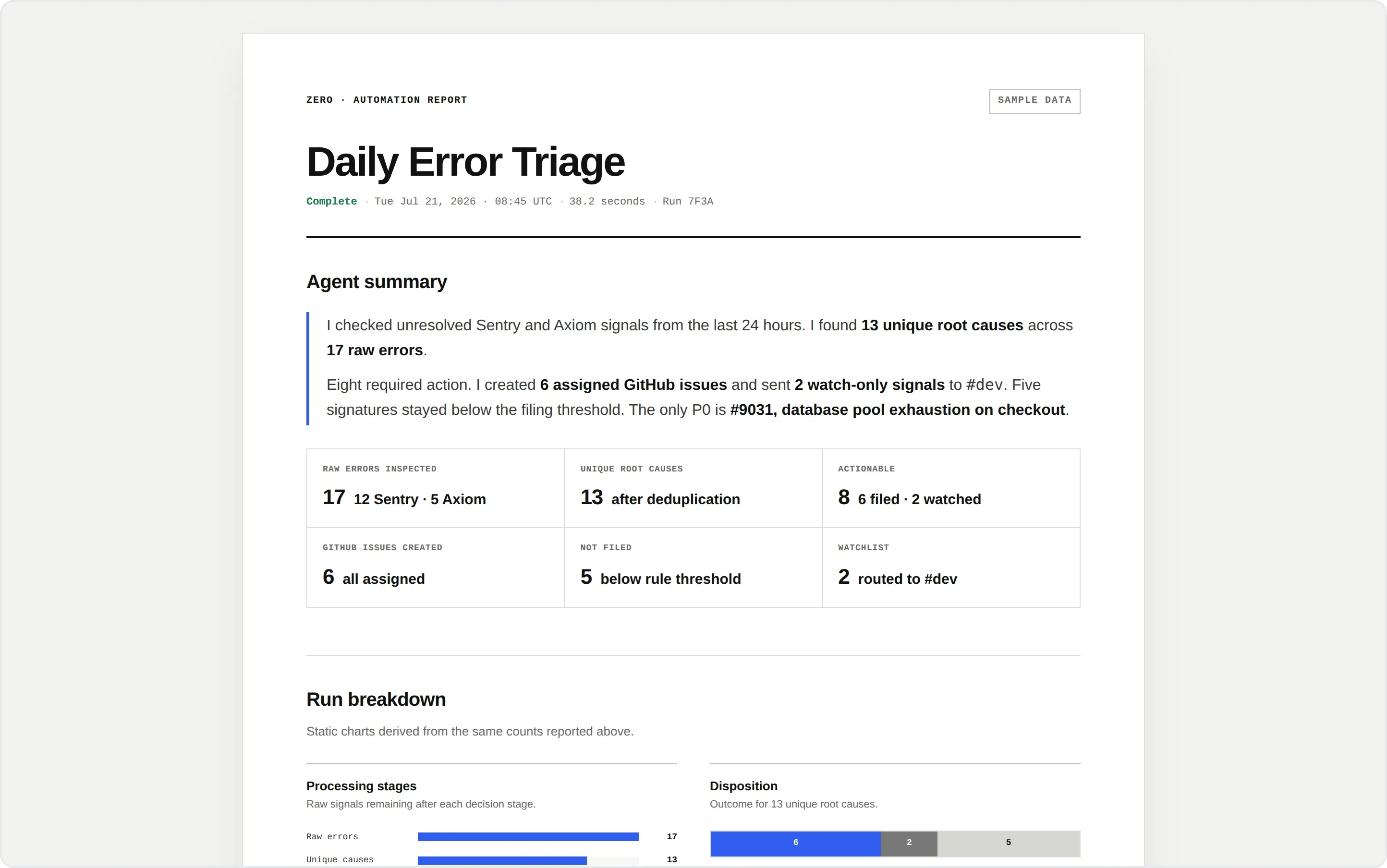 The 8:45am triage run, as the team receives it: 17 raw signals from two sources collapsed into 13 root causes, six filed and assigned, five held below the threshold. See the full report.
2. Daily engineering brief. Four tabs become one message. The agent pulls GitHub, Linear, Sentry, and Plausible before standup, compares each number to its 7-day rolling average, and flags what broke pattern. Nobody has to remember last Tuesday's traffic. ~20 min saved daily.
@Zero every weekday at 8:30am, pull live data from Plausible, Sentry, GitHub, and Linear, flag anomalies vs the 7-day rolling average, and post a formatted 4-section daily brief to #engineering.

See the sample report: Daily engineering brief.
3. Slack bug report to GitHub fix. Describe the bug in plain language in the thread where someone found it. The agent writes the structured issue, labels and assigns it, and when the cause sits in one component it opens a pull request with the fix and a regression test for review. Reports stop dying in threads.
@Zero create issue: pressing ESC in the schedule dialog closes it immediately even with unsaved edits. Should ask for confirmation first. Assign to Lancy. Label as bug, platform. Priority medium.

See the sample report: Slack bug report to GitHub fix.
AI agents for sales and GTM
Speed decides early sales, and the minutes that decide it are the ones right after a call — exactly when follow-up slips.
4. ICP research to outreach drafts. The agent searches Apollo against your ICP, scores each lead across your own signals, writes qualified ones into the pipeline sheet, and drafts a personalized multi-touch Gmail sequence that stops the moment someone replies. ~45 min saved per batch.
@Zero search Apollo for founders and engineering leads at seed to Series A dev tool startups, score each lead 0-18 across our 6 ICP signals, and qualify anything above 10. Add qualified leads to our Google Sheets pipeline, then draft a 3-touch Gmail sequence per lead. Stop the sequence the moment someone replies.

See the sample report: ICP research to outreach drafts.
5. Sales call to follow-up draft. When the recap lands, the agent matches it to the HubSpot deal, scores health with MEDDIC, quotes the transcript for each risk it raises, logs what both sides promised with due dates, writes the CRM note, and prepares the follow-up email with the documents you committed to. Draft only; you hit send. ~40 min saved per meeting.
@Zero when a meeting recap email arrives in Gmail, match it to the HubSpot deal, score deal health with MEDDIC, flag risks with quotes, log both sides' commitments with due dates, write the structured note to HubSpot, and prepare a follow-up draft in Gmail with the documents we promised attached. Never send anything; I review first.

See the sample report: Sales call to follow-up draft.
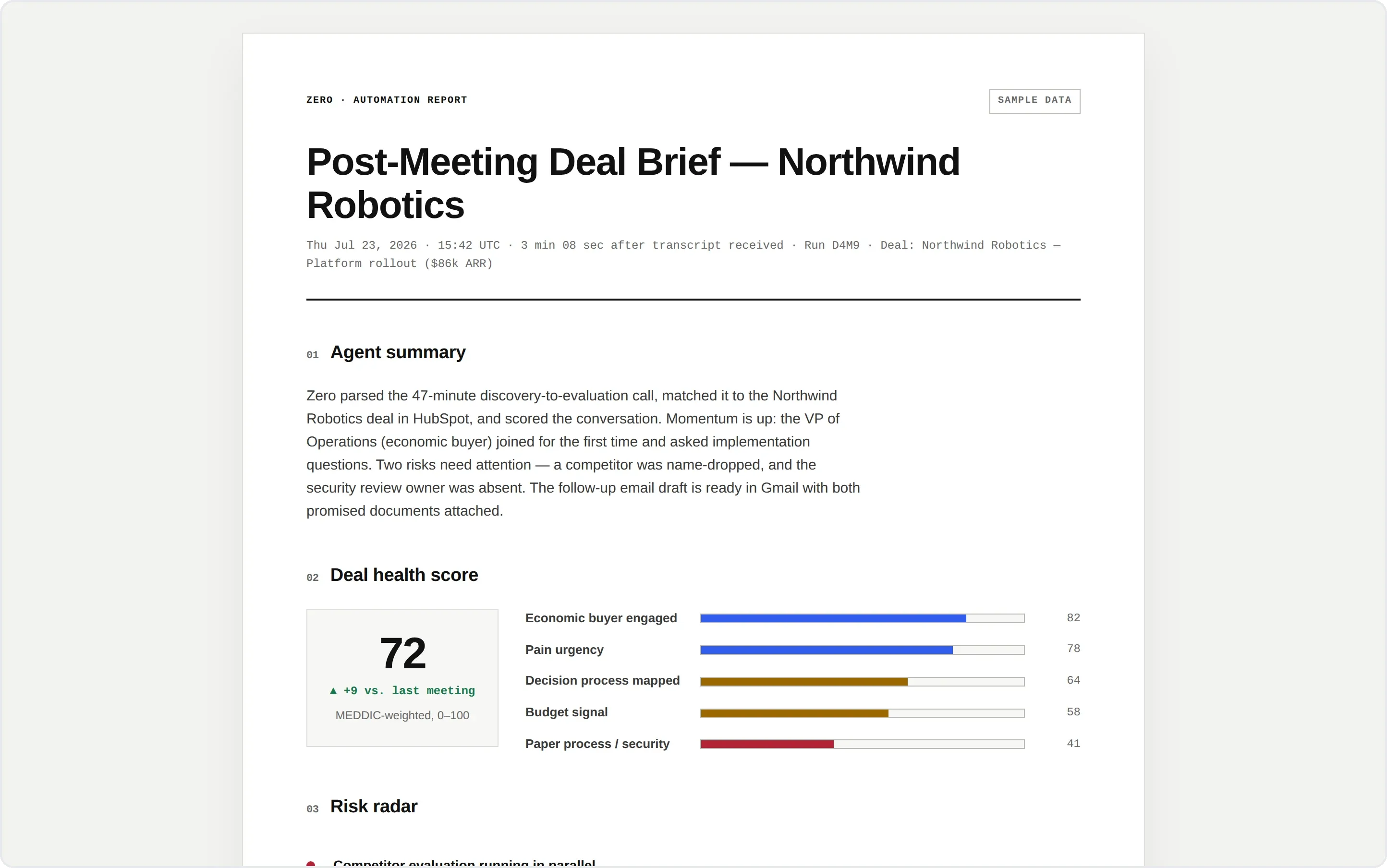 A deal brief written from the transcript: MEDDIC score with the change since last meeting, each risk quoted with a timestamp, and both sides' commitments logged. See the full brief.
6. Calendly booking to tl;dv follow-up. The three qualification answers a prospect types into Calendly usually vanish into a calendar invite. Here they become a pre-call brief, and once the tl;dv transcript exists the same run scores the deal, writes the HubSpot note, and drafts the follow-up. Stage changes wait for the rep. ~55 min saved per meeting.
@Zero when a sales meeting is booked in Calendly, prepare a pre-call brief from the booking answers and HubSpot history. When the matching tl;dv transcript is ready, score the deal, flag risks with timestamped quotes, write the HubSpot note, and create the Gmail follow-up draft. Never send email or change the deal stage without my approval.

See the sample report: Calendly booking to tl;dv follow-up.
7. KOL research to partnership draft. Give the agent a handle. It reads the creator's last 30 posts, works out what they actually care about, and saves a Gmail draft under 150 words that references something specific and recent. Cold outreach that doesn't read like a template. ~20 min saved per creator.
@Zero read @swyx's last 30 X posts to understand their style and interests. Write a personalized cold outreach email under 150 words about a partnership. Reference something specific they posted recently. Save it as a Gmail draft.

See the sample report: KOL research to partnership draft.
AI agents for marketing, SEO, and content production
Marketing runs on recurring research and repetitive production. Agents are good at the gathering and the second draft, which is where the hours go.
8. Keyword gaps to multilingual drafts. The agent pulls live volume and difficulty from Ahrefs, clusters the gaps, and hands you a ranked shortlist. Pick one and the same run writes the post, generates the cover image, and publishes every locale to your CMS as drafts. ~4 hours saved per topic.
@Zero research keywords around AI agent permissions and access control. Pull volume and difficulty from Ahrefs, group them into topic clusters, and send me the top five ranked. Once I pick one, write the post, generate a cover image, and publish it to Strapi in English, Simplified Chinese, and Japanese as drafts.

See the sample report: Keyword gaps to multilingual drafts.
9. Merged PRs to launch copy. Thirty-odd pull requests merged this week, and someone has to decide which ones a customer would notice. The agent reads the merge list, keeps the user-facing changes, groups them into themes, and after your approval ships the changelog to the blog, the Resend list, and X in one run. ~90 min saved weekly.
@Zero every Friday at 9am, read the pull requests merged in the last 7 days. Keep the user-facing ones, group them into themes, and write a changelog post. Preview it in #marketing, then publish it to the blog, send it through Resend to the 'subscribers' audience, and post a thread on X.

See the sample report: Merged PRs to launch copy.
10. Weekly paid ads optimization. Monday's report writes itself before you log in: every campaign week over week on spend, conversions, and CPA, the search terms that burned budget with zero conversions, the campaigns losing impression share to budget, and the specific changes to make next with what each is worth. ~3 hours saved weekly.
@Zero every Monday at 9am, write last week's paid ads report from Google Ads. Compare every campaign to the previous week on spend, conversions and CPA. List search terms that spent more than $20 with zero conversions, flag campaigns losing impression share to budget, and end with the changes you'd make next week and what each one is worth.

See the sample report: Weekly paid ads optimization.
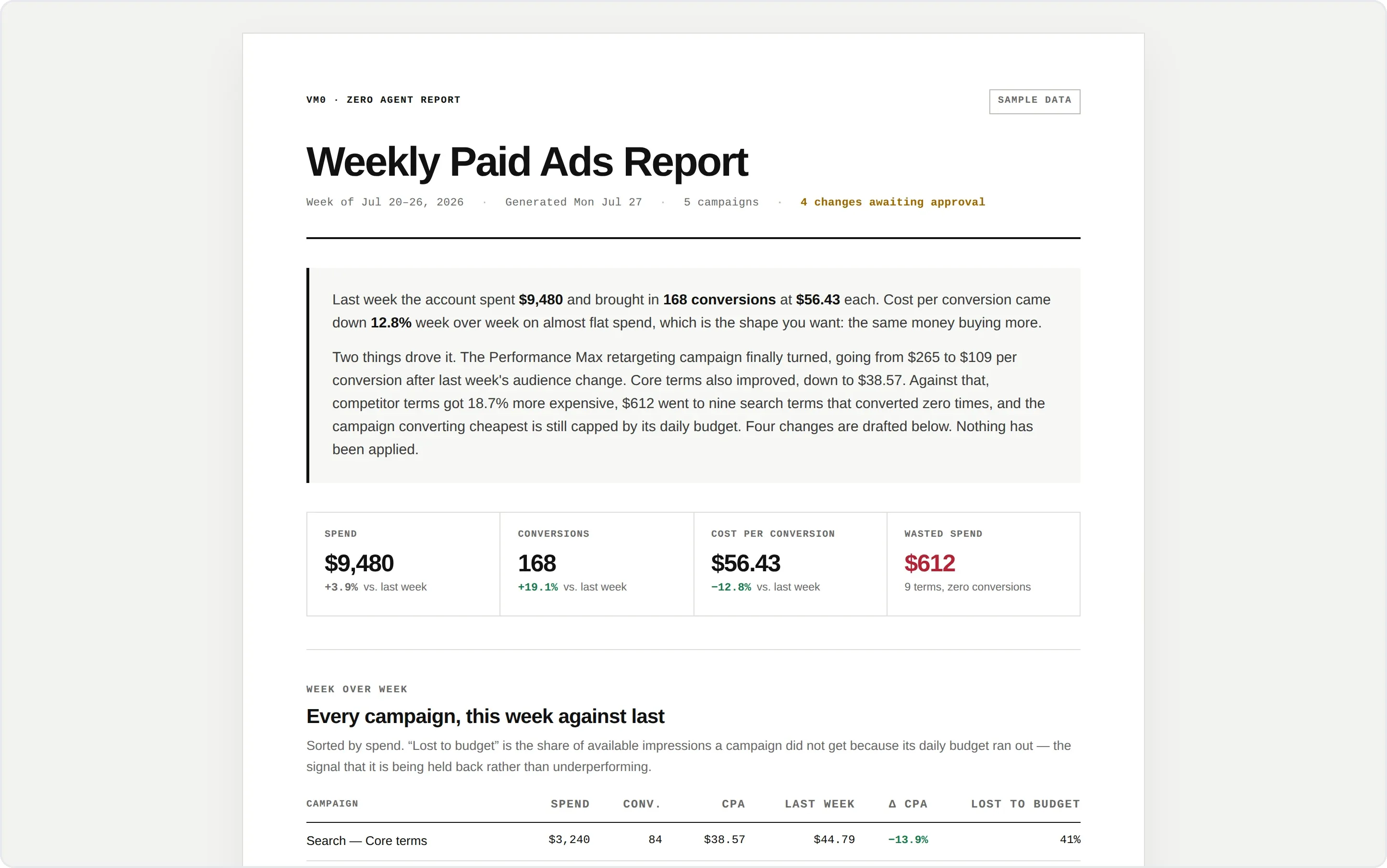 Monday's ads report, with the four recommended changes drafted and nothing applied. See the full report.
11. Brand brief to landing page. Describe the brand and the page. The agent writes every section, sources licensed photography, commits the site to GitHub, and deploys it on Vercel. Four handoffs — copy, design, front end, deploy — collapse into one conversation. ~3 hours saved per page.
@Zero build a landing page for a fine jewelry brand called AURELLE. Quiet-luxury tone, bespoke commissions. Hero, collections, the bespoke process, brand story, FAQ, and a booking call to action. Push it to a new GitHub repo and deploy it to Vercel.

See the sample report: Brand brief to landing page.
12. Screen recording to explainer video. Hand over the raw walkthrough you already recorded. The agent watches it, writes the script, generates a presenter to explain the concept up front, narrates the walkthrough, and edits the whole thing into a 60-second explainer. ~6 hours saved per video.
@Zero here's my screen recording in the 'Dashboard Launch' folder on Google Drive. Watch it, write a script, generate a HeyGen presenter to explain the key concepts, and narrate the walkthrough with an ElevenLabs voiceover. Edit it into a 60-second explainer video.

See the sample report: Screen recording to explainer video.
AI agents for customer insight and reporting
The evidence you need for positioning and for the growth review already exists. It's just spread across four tools and three teams.
13. Customer calls to living messaging doc. Every week the agent reads Intercom conversations and call notes, extracts verbatim jobs, pains, objections, and the lines that landed, separates a one-off remark from a recurring signal, and proposes updates to the shared messaging doc by segment. It doesn't touch CRM fields or publish copy. ~2 hours saved weekly.
@Zero review this week's Intercom customer conversations and Granola call notes. Extract verbatim jobs, pains, objections, and messages that landed. Group repeated signals by HubSpot segment and propose updates to our messaging doc in Drive. Do not alter CRM fields or publish copy.

See the sample report: Customer calls to living messaging doc.
14. Website analytics to weekly growth report. Two analytics tools, one readout. The agent reconciles Plausible and PostHog, reports only material moves in traffic, signups, and funnel steps, checks whether instrumentation broke before blaming the market, and writes the report in Notion without claiming causality it can't evidence. ~90 min saved weekly.
@Zero every Monday, compare the last complete week with the prior week in Plausible and PostHog. Report only material traffic, signup, and funnel changes. Cross-check tracking health, use Notion release notes for context, and draft a concise report. Do not claim causality without evidence.

See the sample report: Website analytics to weekly growth report.
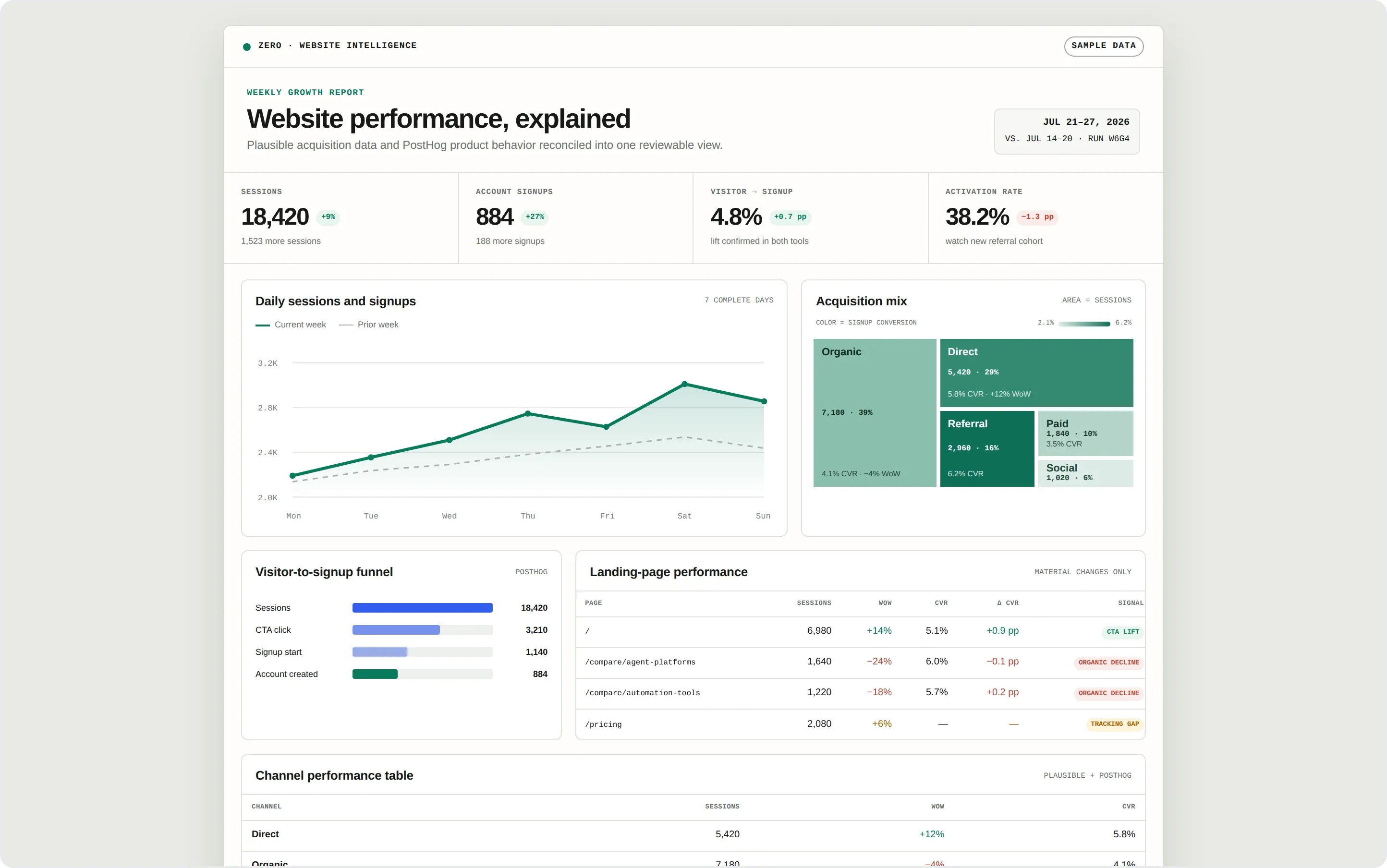 Two analytics tools reconciled into one readout — including a page flagged as a tracking gap rather than a conversion drop. See the full report.
AI agents for finance and professional services
Recurring reporting is a clean fit: same pull, same shape, every period. The judgment call is what an agent must never invent.
15. Xero actuals to budget variance commentary. The ledger closes, but the explanation still lives in card memos, invoices, and finance-team memory. The agent compares Xero actuals and Brex spend against the approved budget, traces material movements back to source evidence, separates timing from structural change, and drafts a private question to the owner for anything it can't evidence. Unknown stays unknown. ~3 hours saved monthly.
@Zero compare July Xero actuals and Brex spend with the approved budget in Google Sheets. Explain only material variances using evidence from transactions and Drive. For anything unexplained, draft a private question to the budget owner. Do not edit Xero or send messages.

See the sample report: Xero actuals to budget variance commentary.
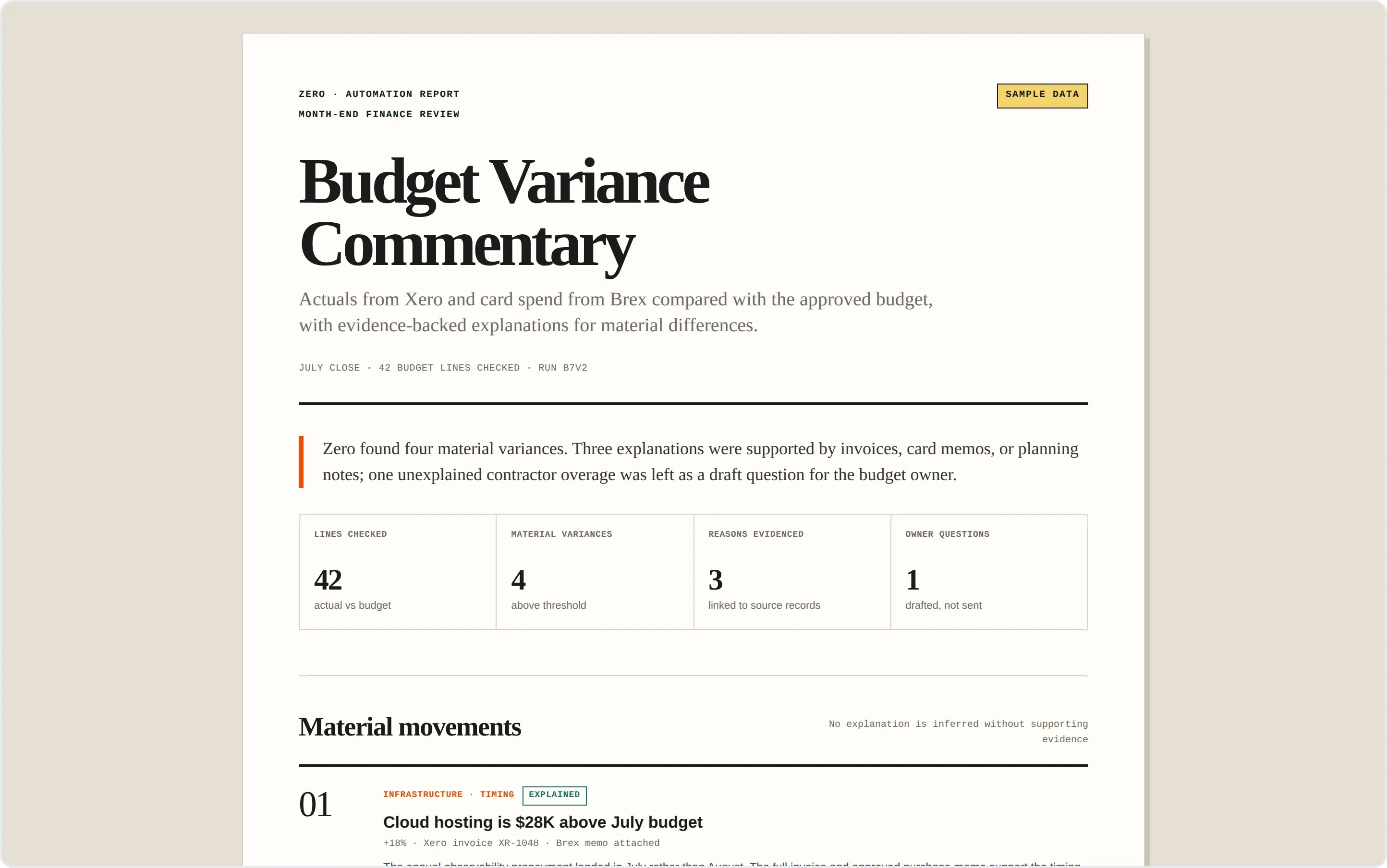 Month-end commentary with the evidence attached and the one unexplained variance left as a question for the budget owner. See the full report.
16. Calendar activity to billable hours recap. Service teams do the work first and record the time later, by which point meetings have generic names and short follow-ups are forgotten. The agent reconstructs the week from calendar activity, notes, and project records, checks Xero for duplicates, and gives every proposed entry a confidence level and a source trail. It never submits a timesheet or raises an invoice. ~90 min saved weekly.
@Zero every Friday, reconstruct likely billable time from my Google Calendar and Granola notes. Match it to active Airtable projects and check Xero for duplicates. Show evidence and confidence for each missing entry. Never submit a timesheet or create an invoice.

See the sample report: Calendar activity to billable hours recap.
AI agents for operations and personal throughput
The last group is the quiet one: work that never appears on a roadmap and still eats the first hour of every day.
17. Daily inbox triage. At 7am, 183 messages are waiting and four of them need a decision today. The agent reads the full threads, puts decisions first, then what you owe a reply, then useful context, and groups the routine notifications by source without deleting anything. One brief, in your DM. ~25 min saved every morning.
@Zero every weekday at 7am, review Gmail from the past 24 hours. Put messages that need a decision today first, then threads I owe a follow-up, then useful context. Group routine notifications by source without deleting anything. Send one morning brief to my Slack DM.

See the sample report: Daily inbox triage.
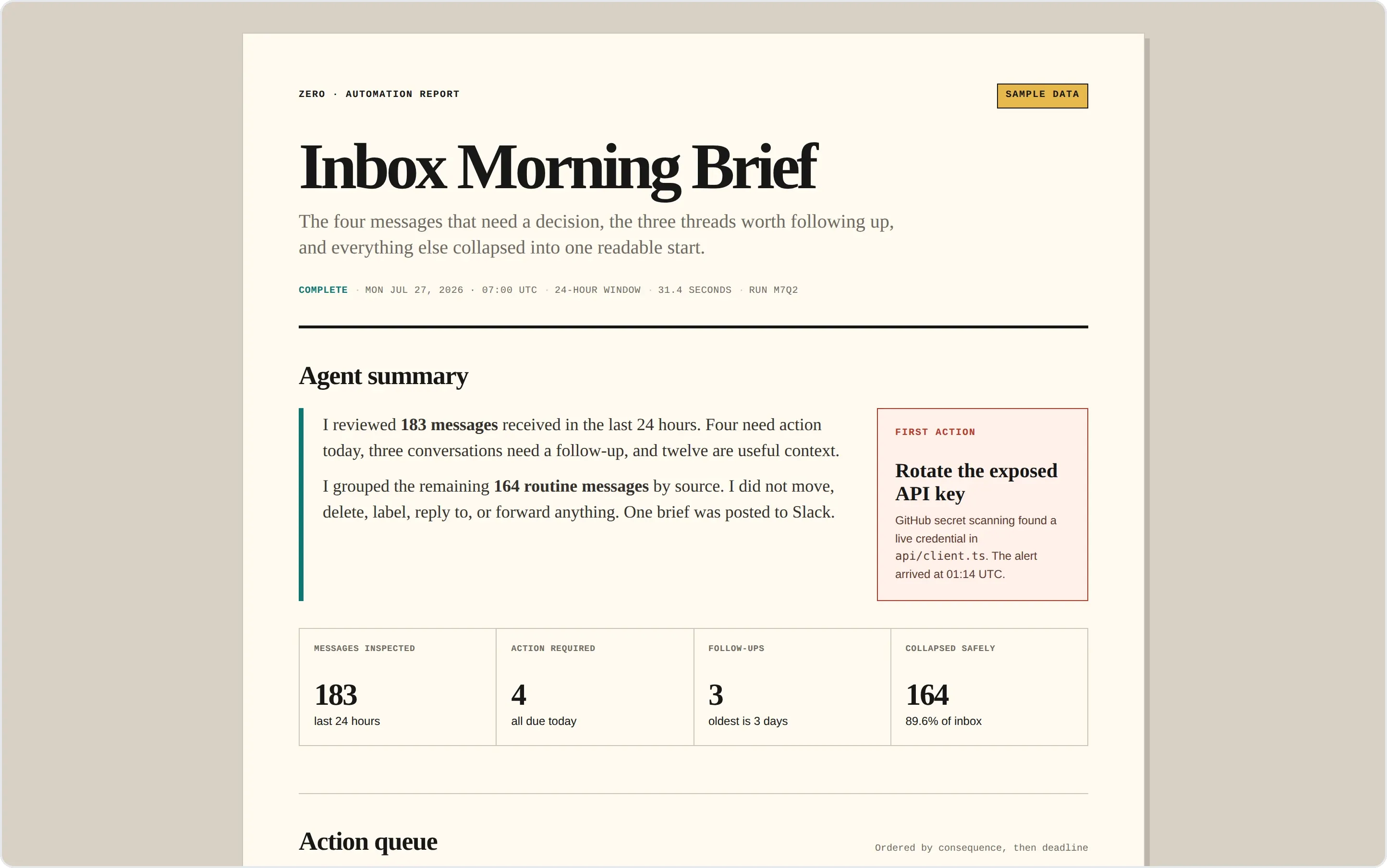 183 messages, read before 7am: four decisions first, the exposed API key at the top, and 164 routine notifications collapsed without deleting anything. See the full brief.
18. Employee onboarding plan. Same 45 minutes of coordination for every new hire. The agent writes the onboarding doc, books the first-week intros, posts the welcome, and DMs the new teammate their agenda, so day one doesn't depend on someone noticing a Slack message. ~45 min saved per hire.
@Zero onboard Sarah Chen joining as Product Designer on April 14. Create the Google Docs onboarding plan, schedule week-1 intro meetings on Google Calendar, schedule a 30-day check-in, post a welcome to #general and DM Sarah her first-week agenda.

See the sample report: Employee onboarding plan.
19. Calendar changes to availability blocks. A meeting moves and your booking page keeps yesterday's availability. The agent recomputes only the affected window and edits only the placeholder holds it created. It never moves, deletes, or reinterprets a real meeting or a private block. ~15 min saved per change.
@Zero when a Google Calendar event is created, updated, or cancelled, recompute the affected Calendly availability window. Update only placeholder holds created by this workflow. Never move or delete a real meeting, booking, or unowned private event.

See the sample report: Calendar changes to availability blocks.
20. X bookmarks to notes and tasks. You save high-signal posts while moving fast and rarely go back to read what they linked to. The agent does that second pass: opens the sources, files sourced notes in Notion, deduplicates against what you already know, and proposes a Linear task only when the research supports a concrete action on an active project. ~60 min saved weekly.
@Zero every Friday, review my new X bookmarks and open their linked sources. Deduplicate them against Notion, file sourced notes, and propose Linear tasks only when an item supports a concrete action for an active project. Never post or engage on X; do not create tasks without approval.

See the sample report: X bookmarks to notes and tasks.
AI agents vs. automation tools: Zero, Zapier, n8n, and Dify
If you're weighing AI agent use cases, you're probably also looking at Zapier, n8n, or Dify. They overlap, but they come at the problem from opposite ends. Zapier, n8n, and Dify are builders: you design the workflow up front and you maintain it. Zero is an agent: you describe the outcome in plain language and it works out the steps on each run.
| Dimension | Zero | Zapier | n8n | Dify |
|---|---|---|---|---|
| What it is | AI teammate across your tools | Trigger-action app automation | Open-source workflow automation | LLM app and agent builder |
| How you set it up | Describe the job in natural language | Build a Zap from predefined steps | Wire nodes on a visual canvas | Orchestrate an app in a console |
| Unstructured input | Reads transcripts, stack traces, threads | Needs fields it can map | Through AI nodes you configure | Yes, inside the app you build |
| Open-ended reasoning | Plans each run against the goal | Fixed steps plus AI actions | Fixed graph plus AI nodes | Yes, within your app's flow |
| Where it runs | In the cloud, on a schedule or event, reporting into Slack or the web app | Web dashboard | Self-hosted or cloud canvas | Web console or embedded app |
| Access control | Per app and per action, read or write, time-boxed | Per connected account | Per credential you self-host | Per app configuration |
| Model choice | Switch frontier models as they ship | Vendor's built-in AI steps | Whichever you wire in | Whichever you configure |
| Pricing model | Credits plus bring-your-own-key, not per seat | Per task and tier | Free open-source, paid cloud | Free open-source, paid cloud |
When each one wins:
- Zapier, when you need a dependable "when X, do Y" between two apps and never want it to improvise.
- n8n, when an engineer wants a self-hosted, branching pipeline with control over every node — the usual answer once a team outgrows per-task pricing.
- Dify, when you're building a customer-facing AI app or chatbot and need RAG and prompt orchestration.
- Zero, when the job changes shape each time and the input is unstructured. Every example above is that kind of work: a transcript, a stack trace, a week of ad spend, 183 emails.
They aren't mutually exclusive. A Zap or an n8n node can hand the judgment step to Zero, and Zero can trigger a deterministic pipeline where one already exists. The real question isn't which tool is best. It's whether the job is a fixed pipeline you should build, or an open-ended one you should hand over.
How to run 20 use cases without 20 licenses
Notice that every example above is the same agent working across different tools, not 20 separate products. Four things follow from that.
It runs without you. These workflows run in the cloud on a schedule or an event trigger, so they keep going after you close your laptop, run several jobs at once, and report back where your team already works.
Access is granted per action. Each connector is scoped to what the workflow actually uses, read or write, per app — read access to your error data never implies write access to your repositories. Grants can be time-boxed to an hour or a day, and sensitive steps stay behind your approval.
A workflow is a team asset. One person builds it, the whole org can run it, and each member attaches their own triggers, schedules, and credentials on top. Nobody rebuilds a workflow that already exists.
Nothing is locked to one model vendor. You can move to a newer frontier model as it ships without rebuilding the workflow, and bring your own key if you'd rather.
Pick the one workflow on this list your team repeats every week, and hand that one over first. Review a single run before you put it on a schedule.
FAQ
What's the difference between an AI agent and agentic AI? Very little that should change your decision. "Agentic AI" describes the broader capability — software that plans and acts — while "AI agent" describes a specific instance doing a job. What matters is whether it can own a real use case from trigger to reviewable result, not which label it wears.
What are the main types of agentic AI use cases? The 20 above fall into six kinds, which is a useful way to audit your own week: engineering and incident response, sales and GTM, marketing and content production, customer insight and reporting, finance and professional services, and operations and personal throughput. Each kind has the same shape — trigger, sources, output, approval point — and differs only in which tools hold the context.
What are the best AI agent use cases for small teams? Start where the work repeats, crosses tools, and ends in something you can verify: inbox triage, error triage, the weekly report, and post-call follow-up. They pay off in the first week and need almost no setup.
How is this different from rule-based automation? Rule-based automation follows fixed conditions and stalls when the input doesn't fit them. An agent reads the unstructured input — the transcript, the stack trace, the thread — compares it across tools, and produces a report, draft, issue, or decision brief within the permissions you set.
Do AI agents replace employees? The useful framing is scope, not headcount. Agents own the repetitive, cross-tool jobs — triage, first drafts, recurring reports — so people spend their time on judgment, relationships, and the calls that need a human. In several examples above the agent is explicitly told to draft and never send.
How do I keep a human in the loop? Say so in the instruction, the way the finance, sales, and calendar examples do: draft only, never send, never edit the ledger, never touch a real meeting. Then connect only the tools the workflow needs, scope each one to read or write, and review the first run before scheduling the next.
What tools does an agent need to be useful? Access to the systems where your work already happens. Zero reaches 200+ tools, and the more a workflow can read from and write to — your inbox, your repo, your CRM, your analytics, your ledger — the more of a job it can own end to end. That cross-tool reach is what separates an agent from a chatbot.